คำสั่ง Run Command สำหรับมือคีย์ลัด สำหรับ Window XP
Windows XP โดยสามารถใช้คำสั่งลัดผ่านตัว Run Command หรือใช้ประดับความรู้
โดย Windows มีคำสั่งที่เรียกว่า Command-line ที่สามารถใช้สั่งงานโปรแกรมได้เพียงแค่พิมพ์คำสั่งสั้นๆ ลงใน Run ในบทความนี้เราได้รวมรวมคำสั่งที่ช่วยให้คุณทำงานได้ง่ายและรวดเร็วขึ้น ซึ่งบางคำสั่งคุณอาจจะไม่เคยรู้ด้วยซ้ำว่ามี และแน่นอนว่าแต่ละคำสั่งสามารถใช้งานได้อย่างง่ายดายกว่าการคลิกเมาส์เพื่อ เปิดโปรแกรมแน่นอน นอกจากนั้นแล้วยังมีคำสั่งเรียกโปรแกรม ที่มีหน้าต่างที่แปลกๆ แต่มีประโยชน์มาก ซึ่งจะไม่แสดงอยู่บนเมนูทั่วๆไป ต้องใช้คำสั่งเรียกใช้เท่านั้น
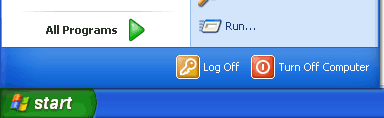
การใช้คำสั่งที่เป็นข้อความ (Command-line) ในการสั่งงาน Windows นั้น สามารถทำได้โดยเรียกหน้าต่าง Run ขึ้นมาก่อน โดยคลิกไปที่ปุ่ม Start แล้วเลือกเมนู Run ทางด้านขวาของ All Programs ตามภาพด้านล่างเลย
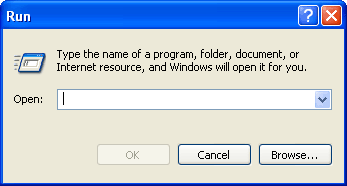
จากนั้นเมื่อหน้าต่าง Run ปรากกฎขึ้นมาก็สามารถพิมพ์คำสั่งลงในช่อง Open: แล้วคลิกปุ่ม OK เพื่อใช้งานคำสั่งนั้นๆได้ทันที
ตารางต่อไปนี้เป็นคำสั่งที่ใช้งานได้บน Windows XP (และ Windows ตระกูล 2000)
***นอกจากการใช้งานคำสั่งด้วยวิธีข้างต้นแล้ว ยังสามารถนำคำสั่งเหล่านี้ไปสร้างเป็น shortcut ได้อีกด้วย
***สำหรับท่านที่ไม่่ถนัดใช้งานก็ก๊อปปี้เก็บไว้ศึกษาก็ยังดี มีประโยชน์มากจริงๆ
คำอธิบาย คำสั่ง
- เรียกโปรแกรม Accessibility Options
access.cpl
- เรียกโปรแกรม Add Hardware hdwwiz.cpl
- เรียกโปรแกรม Add/Remove Programs appwiz.cpl
- เรียกโปรแกรม Administrative Tools control admintools
- ตั้งค่า Automatic Updates wuaucpl.cpl
- เรียกโปรแกรม Bluetooth Transfer Wizard fsquirt
- เรียกโปรแกรม เครื่องคิดเลข (Calculator) calc
- เรียกโปรแกรม Certificate Manager certmgr.msc
- เรียกโปรแกรม Character Map charmap
- เรียกโปรแกรม ตรวจสอบดิสก์ (Check Disk Utility) chkdsk
- เรียกดูคลิปบอร์ด (Clipboard Viewer) clipbrd
- เรียกหน้าต่างดอส (Command Prompt) cmd
- เรียกโปรแกรม Component Services dcomcnfg
- เรียกโปรแกรม Computer Management compmgmt.msc
- เรียกดู/ตั้ง เวลาและวันที่ timedate.cpl
- เรียกหน้าต่าง Device Manager devmgmt.msc
- เรียกดูข้อมูล Direct X (Direct X Troubleshooter) dxdiag
- เรียกโปรแกรม Disk Cleanup Utility cleanmgr
- เรียกโปรแกรม Disk Defragment dfrg.msc
- เรียกโปรแกรม Disk Management diskmgmt.msc
- เรียกโปรแกรม Disk Partition Manager diskpart
- เรียกหน้าต่าง Display Properties control desktop หรือ desk.cpl
- เรียกหน้าต่าง Display Properties เพื่อปรับสีวินโดวส์ control color
- เรียกดูโปรแกรมช่วยแก้ไขปัญหา (Dr. Watson) drwtsn32
- เรียกโปรแกรมตรวจสอบไดร์ฟเวอร์ (Driver Verifier Utility) verifier
- เรียกดูประวัติการทำงานของเครื่อง (Event Viewer) eventvwr.msc
- เรียกเครื่องมือตรวจสอบไฟล์ File Signature Verification Tool sigverif
- เรียกหน้าต่าง Folders Options control folders
- เรียกโปรแกรมจัดการ Fonts control fonts
- เปิดไปยังโฟลเดอร์ Fonts (Fonts Folder) fonts
- เรียกเกม Free Cell freecell
- เปิดหน้าต่าง Game Controllers joy.cpl
- เปิดโปรแกรมแก้ไข Group Policy (ใช้กับ XP Home ไม่ได้) gpedit.msc
- เรียกเกม Hearts mshearts
- เรียกโปรแกรมสร้างไฟล์ Setup (Iexpress Wizard) iexpress
- เรียกโปรแกรม Indexing Service ciadv.msc
- เรียกหน้าต่าง Internet Properties inetcpl.cpl
- เรียกหน้าต่าง Keyboard Properties control keyboard
- แก้ไขค่าความปลอดภัย (Local Security Settings)secpol.msc
- แก้ไขผู้ใช้ (Local Users and Groups) usrmgr.msc
- คำสั่ง Log-off logoff
- เรียกเกม Minesweeper winmine
- เรียกหน้าต่าง Mouse Properties control mouse หรือ main.cpl
- เรียกหน้าต่าง Network Connections control netconnections หรือ ncpa.cpl
- เรียกหน้าต่าง Network Setup Wizard netsetup.cpl
- เรียกโปรแกรม Notepad notepad
- เรียกโปรแกรม Object Packager packager
- เรียกคีย์บอร์ดบนหน้าจอ (On Screen Keyboard) osk
- เรียกหน้าต่าง Performance Monitor perfmon.msc หรือ perfmon
- เรียกหน้าต่าง Power Options Properties powercfg.cpl
- เรียกหน้าต่าง Printers and Faxes control printers
- เรียกหน้าต่าง Printers Folder printers
- เรียกโปรแกรม Private Character Editor eudcedit
- เรียกหน้าต่าง Regional Settings intl.cpl
- เรียกหน้าต่าง Registry Editor regedit
- เรียกโปรแกรม Remote Desktop mstsc
- เรียกหน้าต่าง Removable Storage ntmsmgr.msc
- เรียกหน้าต่าง Removable Storage Operator Requests ntmsoprq.msc
- เรียกดู Policy ที่ตั้งไว้ (ใช้กับ XP Home ไม่ได้) rsop.msc
- เรียกหน้าต่าง Scanners and Cameras sticpl.cpl
- เรียกโปรแกรม Scheduled Tasks control schedtasks
- เรียกหน้าต่าง Security Center wscui.cpl
- เรียกหน้าต่าง Services services.msc
- เรียกหน้าต่าง Shared Folders fsmgmt.msc
- คำสั่ง Shuts Down shutdown
- เรียกหน้าต่าง Sounds and Audio mmsys.cpl
- เรียกเกม Spider Solitare spider
- แก้ไขไฟล์ระบบ (System Configuration Editor) sysedit
- แก้ไขการตั้งค่าระบบ (System Configuration Utility) msconfig
- ตรวจสอบระบบด้วย System File Checker Utility (เริ่มทันที) sfc /scannow
- ตรวจสอบระบบด้วย System File Checker Utility (เริ่มเมื่อบู๊ต) sfc /scanonce
- เรียกหน้าต่าง System Properties sysdm.cpl
- เรียกหน้าต่าง Task Manager taskmgr
- เรียกหน้าต่าง User Account Management nusrmgr.cpl
- เรียกโปรแกรม Utility Manager utilman
- เรียกโปรแกรม Windows Firewall firewall.cpl
- เรียกโปรแกรม Windows Magnifier magnify
- เรียกหน้าต่าง Windows Management Infrastructure wmimgmt.msc
- เรียกหน้าต่าง Windows System Security Tool syskey
- เรียกตัวอัพเดตวินโดวส์ (Windows Update) wupdmgr
- เรียกหน้าต่าง Windows XP Tour Wizard tourstart
- เรียกโปรแกรม Wordpad write
Credit : Tkbank |

 08.7557.7772
  Line. goijc